Ask for what you need, collect the quotes, and compare what suppliers can back up.

Velstrian Buy helps public and private buyers, for example councils, schools, housing associations and private companies buying a service, compare replies fairly.

Your team does all the scoring. Your first 7 days are free. A card is needed to start.
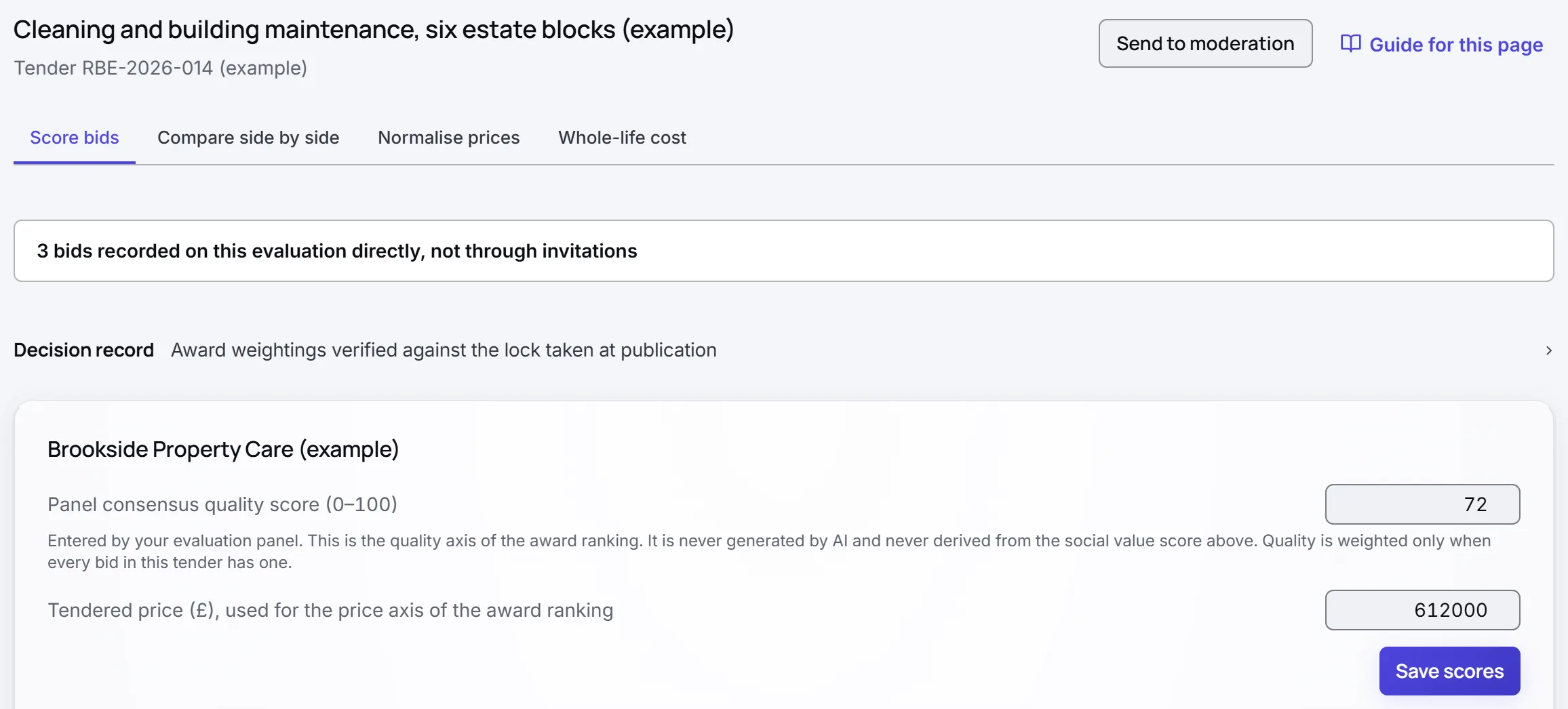
An evaluation in Velstrian Buy for the demo buyer: three supplier bids recorded, the award weightings checked against the lock taken when the pack was published, and the panel score for the first bid.
A real screen from a demo account: the evaluation, with the weightings checked and the panel scoring each bid.

Facilities support, housing association

  1. Request sent To 4 suppliers, each by their own link
  2. 4 replies in Each supplier got a receipt
  3. Proof found for each question Quoted word for word
  4. Your panel scored it The AI never gives a mark

Five steps, from asking to choosing.

Velstrian Buy keeps it all in one place.

  • Step 1

    Write a clear request

    Set your scoring before anyone replies, or send a Quick RFQ.

    • Questions settled before any reply arrives
    • Scoring fixed, reuse it next time
    • A Quick RFQ, written by you
    A requirement pack in Velstrian Buy for the demo buyer: cleaning and building maintenance for six estate blocks, with award weightings of price 40%, quality 40% and social value 20%, and the scale every reply is scored on.
  • Step 2

    Collect the replies in one place

    Each supplier gets a personal link, a receipt and every answer.

    • A receipt for every reply
    • Questions answered to all, names hidden

    Example data. Product design.

    Responses received from four suppliers, one missing its price, and a supplier question answered and shared with every supplier.
  • Step 3

    Read every reply side by side

    Every bid as one total cost, like for like.

    • The same amount of work over the same 3 years

    Example data. Product design.

    Whole life cost of three priced responses over three years, split into price and running costs, showing the lowest price is not the lowest cost.
  • Step 4

    See what each supplier can back up

    Each supplier's proof, word for word, with its page.

    • Quotes found with page and section
    • No proof, nothing shown. Nothing is invented
    An evaluation in Velstrian Buy for the demo buyer: the award weightings checked against the lock taken when the pack was published, and the panel score and price for the first bid.
  • Step 5

    Record your decision and why

    Your panel scores and says why, then tracks delivery.

    • Panel scores recorded
    • Alerts if delivery targets fall behind

    Example data. Product design.

    Award decision with final weighted scores out of 100, outcome letters sent, the waiting period before signing, and the supplier promises becoming a delivery checklist.

The AI reads and summarises. It never sets a mark. People score.

Every supplier must be treated the same way (the equal treatment duty in the Procurement Act 2023), so your panel scores every reply. The first read only points to where the proof is, question by question. It never scores.

What the first read may do Design constraint
  1. Find the proof for each question

    Quoted word for word from the reply

    Does
  2. Leave out what it cannot find

    No quote, nothing shown

    Does
  3. Flag uneven scoring

    Advisory, after your panel has scored

    Does
  4. Set, change or suggest a mark

    The panel evaluates and scores

    Never
Example data. Four things asked of the first read. It does three, and setting a mark stops dead at the line.

AI-generated reading aid, advisory only, not a score. It locates evidence to help you read faster. It does not score, rank, or recommend a mark. Under the Procurement Act 2023 (equal treatment), the panel evaluates and scores every response. No mark is set, changed, or suggested here.

Shown on every pre-read in the product

Start in three steps.

  1. Step 1 of 3

    Say what you need

    Write down what you need and how you will judge the replies, before any supplier responds.

  2. Step 2 of 3

    Invite suppliers

    Send each supplier a personal link, or use a Quick RFQ for a smaller job. They upload their reply and get a receipt.

  3. Step 3 of 3

    Compare and decide

    Read what each supplier said against each question, with the quotes found for you. Your panel sets every mark.

Your team decides. The price is on the page.

People set every score, and you can see what it costs before you start.

  • Word for word

    Every quote is found word for word in the reply, and left out if it is not there

  • Human score

    Evaluators set and enter every score. The AI never sets, changes or suggests a mark

  • Guidance

    Checks against the rules and flags on uneven scoring guide your team. Every decision stays with you

  • £299/mo

    Buyer Pro starts at £299 a month, 10% off when paid annually. Start by card

  • AES-256 at rest
  • TLS 1.3 in transit
  • GDPR compliant
  • EU data residency
  • Follows ISO/IEC 27001
  • ICO registered

Two ways to buy.

Both prices are published. On Buyer Pro your first 7 days are free, and a card is needed to start. Buyer Portfolio starts paid, by card or by invoice.

  • Buyer Pro

    Contracting authorities and private sector procurement teams

    £299 a month

    5 users, 750 AI credits a month and 10 guest evaluators.

    10 guest evaluators, requirement builder, evidence locator and delivery monitoring.

    Start now
  • Buyer Portfolio

    Card or invoice

    Large authorities, groups and multi entity buyers

    £699 a month

    10 users included, more by arrangement, 3,000 AI credits a month and 25 guest evaluators.

    25 guest evaluators. Pay by card, or by invoice on 30 days with a PO number.

    Start now

    Talk to us about frameworks (approved supplier lists)

Compare all supplier and buyer plans

The detail, for when you need it.

You do not need any of this to start. Open a line when a rule comes up, and read every part of Velstrian Buy.

The rules for public buying

Four duties and notes that apply to public contracts, each in plain words.

Procurement Act 2023, section 52

Public contracts with an estimated value above £5m must have at least three published key performance indicators, the targets the contract is measured against. Velstrian Buy flags this threshold, counts your published targets and shows any shortfall.

Section 71 performance assessment

Performance against those published targets must be assessed and published. Velstrian Buy keeps the targets beside your delivery records, so the assessment comes straight from the record for the life of the contract.

PPN 026 and social value

Social value is the extra good your supplier delivers locally. PPN 026, the guidance on the Social Value Model, applies to central government procurements commenced on or after 1 January 2027 at £1m inc VAT or above. Totals are worked out in code from a library of measures aligned to National TOMs conventions. National TOMs (Themes, Outcomes and Measures) is a common UK way to count social value. It is not a full National TOMs implementation.

Transparency and award notice returns

An award notice return is the public record of who won. It is put together from your recorded contracts for you to review and publish. The reports behind it export cleanly for committee packs or scrutiny requests.

How delivery is rated

What a supplier delivered against what they promised, worked out in code on five fixed bands, per theme and per contract.

  • ≥ 95% On track
  • 80 to 94% At risk
  • < 80%, no deadline passed Not yet due
  • < 80%, deadline passed Breached
  • Nothing committed No data, never green

Alongside your portal, not instead of it.

Your competition keeps running where it runs today. Velstrian Buy is the social value and scoring layer beside it.

What it does, and what it does not do

What it does

  • Builds and publishes a social value requirement with a scoring guide fixed in advance
  • Finds the proof for each published question, quoted word for word from the reply
  • Gives the panel one place to score against the scoring guide you published
  • Invites suppliers to respond by personal link, with a receipt for every reply and one list of questions and answers for all of them
  • Runs Quick RFQ for smaller requests: a request for quotes sent by personal link and the quotes collected in one place
  • Records awarded contracts and the promises made in them
  • Adds up what was promised against what was delivered, by theme, and flags under delivery
  • Assembles the Procurement Act 2023 award notice return for you to publish

What it does not do

  • Score, rank or recommend a mark on any reply
  • Replace Jaggaer, Atamis, In-tend, ProContract or Proactis as your system of record
  • Publish your formal tender notices. Those go on Find a Tender or through your e-sourcing portal
  • Hold the formal competition audit trail, which stays in your e-sourcing system
  • Give legal advice. The checks against the rules guide you
  • Form or publish a view on a supplier standing

Every part of the buyer workspace

All 16 parts, from writing the request to reporting on delivery.

  1. Requirements

    Set what you measure and how much it counts.

    Read in full: Requirements

    Social value requirement packs. Set what you will measure and how much each part counts, before any reply arrives.

  2. Quick RFQ

    A short request for quotes for smaller jobs.

    Read in full: Quick RFQ

    For smaller jobs, describe the work and check the scope. Then download a request for quotes and send it to suppliers by personal link. Each supplier uploads a quote and gets a receipt. You write the scope. The AI does not draft it.

  3. Supplier invitations and clarifications

    Personal links, and every answer sent to all.

    Read in full: Supplier invitations and clarifications

    Invite suppliers to respond by personal link. Each reply gets a receipt, and the answer to any supplier question is published to every invited supplier without saying who asked.

  4. Evaluations

    Your evaluators score against the published guide.

    Read in full: Evaluations

    Score supplier bids against the scoring guide for the requirement. Your evaluators set every score. The AI check for uneven scoring only advises and never changes a number.

  5. Evaluation pre-read

    Finds the proof for each question you asked.

    Read in full: Evaluation pre-read

    A first read of each reply that finds the proof for each published question. It never scores.

  6. Prices side by side

    Every bid as one total cost, like for like.

    Read in full: Prices side by side

    Enter each supplier price schedule to see every bid as one whole life cost, the total over the same term and the same amount of work, then set options side by side and record what your team judges.

  7. Whole life costs

    Each option costed across its whole life.

    Read in full: Whole life costs

    Cost each way of delivering a requirement across its whole life, from assumptions you supply.

  8. Pipeline

    Every purchase you are running, in one list.

    Read in full: Pipeline

    Every procurement you are planning, running, scoring, awarding or managing, with dates and value worked out from your own records.

  9. Supplier screening

    Public register checks, and you decide.

    Read in full: Supplier screening

    Checked against public registers when a reply arrives or a supplier joins an evaluation. It is not a score and never excludes a supplier. You decide.

  10. Supplier risk

    Risk signals across your suppliers, in one view.

    Read in full: Supplier risk

    Risk signals across your suppliers, with platform records kept apart from flags raised by your team.

  11. Working with your suppliers

    Scorecards, reviews and shared actions.

    Read in full: Working with your suppliers

    Supplier relationship management in one place: scorecards, review meetings and shared actions per supplier, every open action in one table, and feedback each quarter.

  12. Savings you can show

    Savings claimed, and what finance signed off.

    Read in full: Savings you can show

    Value realisation: the savings and other value claimed against each supplier, and what finance has signed off.

  13. Contracts

    Each contract and its social value promises.

    Read in full: Contracts

    Awarded contracts and their social value promises, recorded so delivery has something to be measured against.

  14. Suppliers

    Each supplier’s delivery record, in one list.

    Read in full: Suppliers

    Your supplier directory and each supplier’s delivery record across the contracts you have awarded.

  15. Social value oversight

    Promised against delivered, with an alert.

    Read in full: Social value oversight

    Social value promised against delivered across your awarded contracts and suppliers, by National TOMs theme, with under delivery raised as an alert.

  16. Transparency and reports

    The award notice return and committee reports.

    Read in full: Transparency and reports

    A Procurement Act 2023 award notice return across your contracts, plus reports to export for committee and scrutiny.

Bidding for contracts instead?

If you are a supplier answering tenders, Velstrian Bid drafts answers from your own past documents.

See Velstrian Bid

A free tool, no account needed

Paste a tender into the Tender Compliance Matrix and read back what it asks for, each item with the line it came from.

Open the free tool

Prices on the page

Buyer Pro is £299 a month, with every buyer and supplier plan on our pricing page.

See all prices

Frequently asked questions

What is a tender?

A tender is how an organisation asks suppliers to bid for a piece of work. It sets out what is needed, asks questions, and explains how answers will be evaluated. Public authorities publish tenders openly, and private companies send them to invited suppliers.

What is an evaluation?

An evaluation is how a buyer reviews and scores the responses received from suppliers against the published criteria. Your panel of evaluators reads each bid, checks the evidence, and enters their scores and notes in one place.

What is a contract award?

An award is the formal decision to give the contract to the winning supplier. After award, you record the agreed terms and commitments so delivery can be tracked throughout the life of the contract.

Does the AI score or rank supplier bids?

No. Your evaluators set every score. The first read of each reply only finds the proof for each question you published. It does not score, rank, or recommend a mark, and every card it shows says so. The law asks you to treat every supplier the same way (the equal treatment duty in the Procurement Act 2023), so your panel scores every reply. Once scoring is done, an AI check can point out uneven scoring for your panel to look at. It never changes a number.

Does Velstrian Buy replace our e-sourcing portal?

No. It is not a system of record and it does not run your formal competition. Formal notices and the competition audit trail stay in the portal you already use, such as Jaggaer, Atamis, In-tend, ProContract or Proactis. It sits alongside that portal. You build the social value requirement, read the responses against it, and monitor delivery after award. For smaller requests, Quick RFQ sends the request to suppliers by personal link and collects their quotes and receipts in one place.

How is social value handled on the buyer side?

You write the requirement with its scoring guide fixed in advance, so what you measure and how much each part counts are settled before replies arrive rather than argued afterwards. After award, the promises on each contract are added up against delivery by theme and rated red, amber or green: on track at 95% or above, at risk from 80%, and below 80% not yet due until its deadline passes, then breached. A contract with nothing promised shows as no data rather than green. Measures are aligned to National TOMs conventions (Themes, Outcomes and Measures, a UK framework for counting social value). It is not a full National TOMs implementation.

Are the quotes it shows us real, or generated?

Found, not written. Every quote is found word for word in the supplier's own reply and is left out if it cannot be found there. The first read points at the proof in the reply. It does not write a summary of what the reply might have said.

What does it cost?

Buyer Pro is £299 a month, or £3,229 a year, with 5 users, 750 AI credits a month and 10 guest evaluators. Buyer Portfolio is £699 a month, or £7,549 a year, with 10 users, 3,000 AI credits a month and 25 guest evaluators. Annual prices are 10% off twelve months. On Buyer Pro your first 7 days are free, and a card is needed to start. Buyer Portfolio starts paid, by card or by invoice on 30 days with a PO number.

Can it produce our Procurement Act transparency return?

It produces an award notice return across your recorded contracts, which you review and publish. The checks it applies, including section 52 on published targets (KPIs) above an estimated value of £5m and section 71 on assessing and publishing performance, guide your team, and what you publish is your decision.

Read every question

Your next purchase can start today.

Your first 7 days are free. A card is needed to start. Or talk it through with us first.